
Multi-Factor Authentication (MFA), sometimes referred to as Two-Factor Authentication (2FA), is a security regime that verifies your identity by challenging you to provide more than just a username and password. MFA requires other additional credentials, such as a code from your smartphone, or your fingerprint, or facial imprint.
MFA makes it harder for an unauthorised person to gain access to your Fixus account.
Getting set up
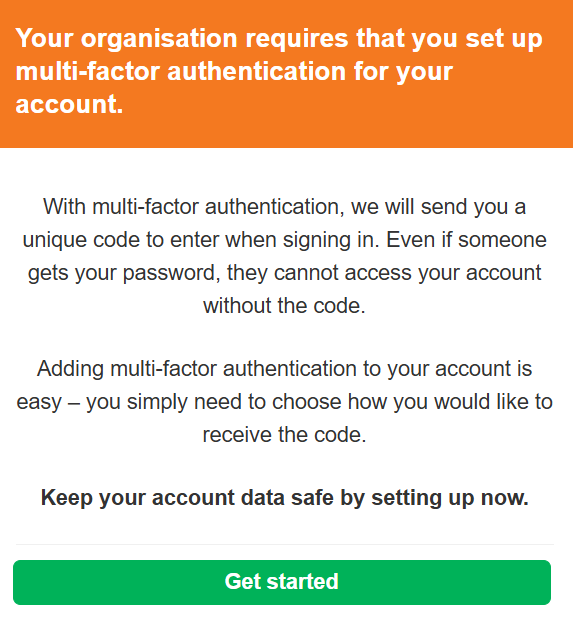
The next time you access your Fixus account, you’ll be guided through the multi-factor authentication setup process. After you initially access your Fixus account with your Email Address and Password, you will then need to choose one of the available authentication options. This will become your second factor to be used when signing in.
Note: the Fixus Administrator may Enforce MFA on an account (if this is the case the ‘Skip this for now’ button will not be visible)
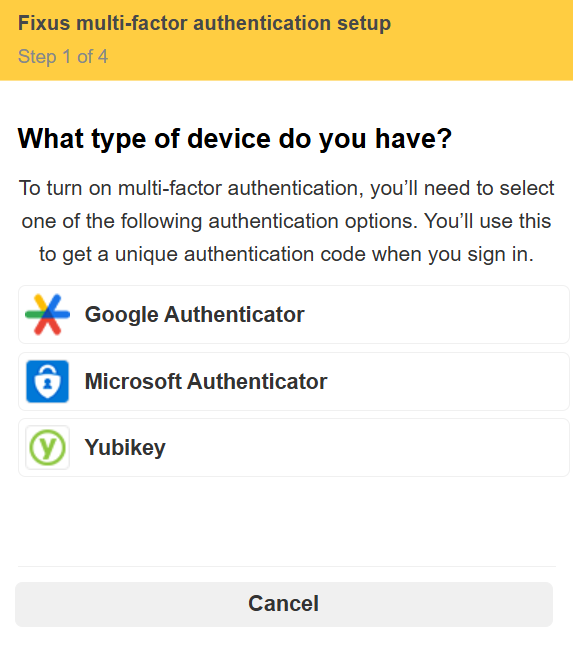
Choose your MFA method
Fixus currently supports the following MFA methods:
Google Authenticator
Use the Google Authenticator app on your smartphone to generate security codes.
Best for: Most users.
[Go to Google Authenticator Setup Guide]
Microsoft Authenticator
Use the Microsoft Authenticator app on your smartphone to generate security codes.
Best for: Users already using Microsoft 365 or Microsoft services.
[Go to Microsoft Authenticator Setup Guide]
YubiKey
Use a physical security key that generates authentication codes or provides hardware-based authentication.
This is for users who have been provided Yubi-keys to help login
[Go to Yubikey Authenticator Setup Guide]